Hour by hour, not morning-noon-night
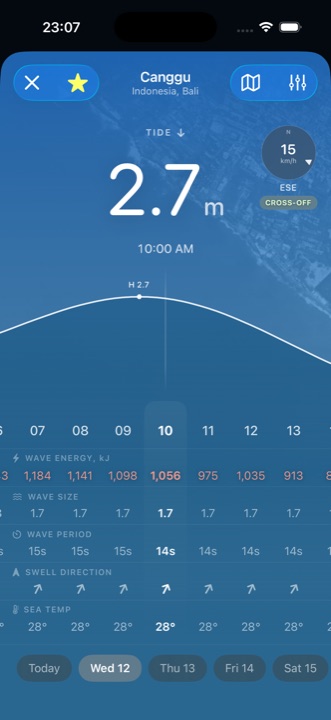
Wave size, period and swell direction for every hour of the next seven days — scrub the day and watch the sky above the numbers change with it.
For iPhone & Apple Watch
Surfbreak reads the swell, the wind and the tide for your spots — then your Apple Watch counts every wave you ride, with nothing to press in the water.
Download on the App Store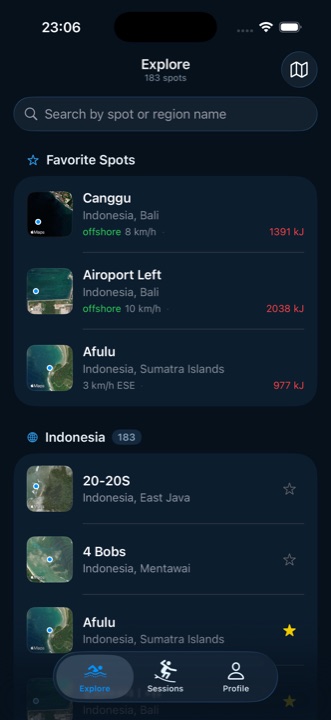
Features
Deciding whether to go, and knowing what you got. Surfbreak does both, and nothing else.
Wave size, period and swell direction for every hour of the next seven days — scrub the day and watch the sky above the numbers change with it.
Not just a number: OFFSHORE, CROSS-OFF or onshore, worked out against the way the break actually faces. You know before you get in the car.
The whole curve for the day with the level at the hour you're looking at — the thing that decides whether a break works at all.
Start a session on your wrist and forget it. Rides are found by speed while you surf — there is nothing to press out there, and nothing to remember on the way home.
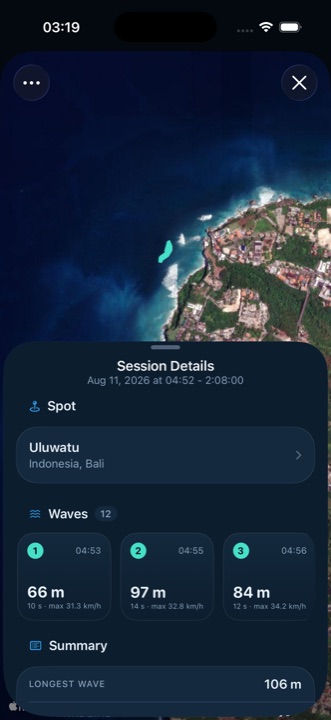
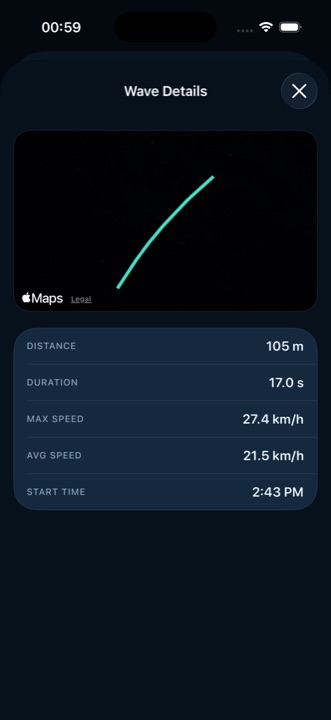
Tap a ride and see the line you drew on the water, with its distance, duration, top and average speed.
The watch hands each session to your iPhone by itself. Add an account and they back up to the cloud, then come back on a new phone — or stay a guest and keep everything on the device.
Forecast
Pick an hour and everything moves with it — the tide, the size, the wind, even the colour of the sky behind the numbers. No scrolling through a table to find out when it turns on.
Spots
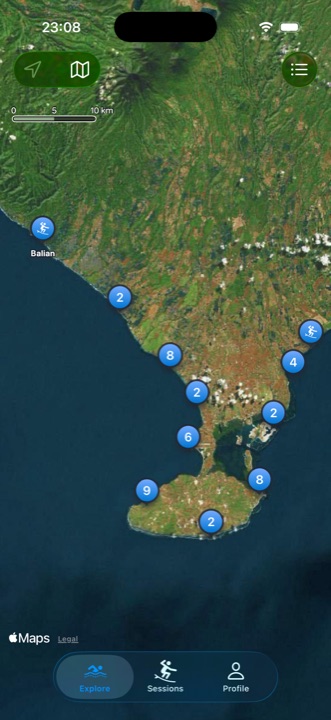
183 breaks across Indonesia — Bali, Lombok, Sumbawa, Java and the Mentawai Islands. Map or list, both open the same forecast.
Wave counting
No button in the water, no arguing about the count in the car park. The watch reads GPS and motion for the whole session, finds the rides by speed, and hands you the numbers when you paddle in.
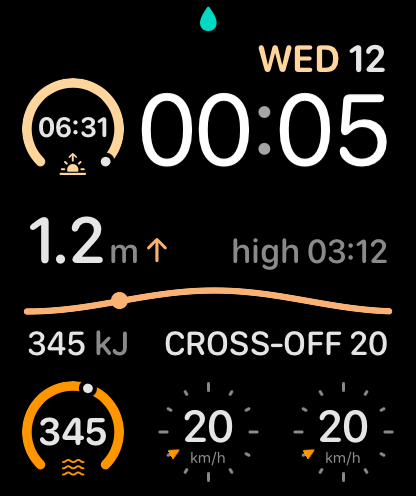
Nothing to configure. The ready screen already shows your spot and the water level, so the last thing you read before paddling out is whether it's worth it.
GPS and motion keep running with your wrist down and the screen dark. Rides are found by speed as they happen, and the counter on the watch keeps up while you're still out.
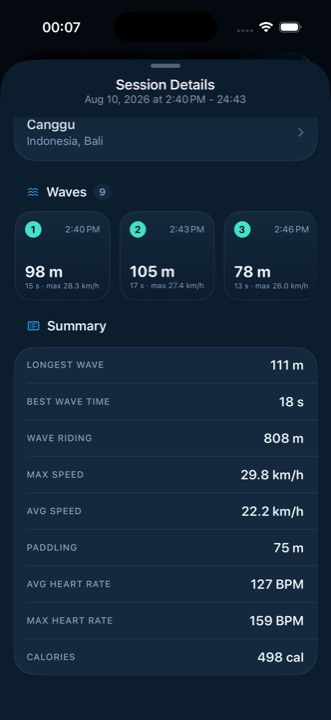
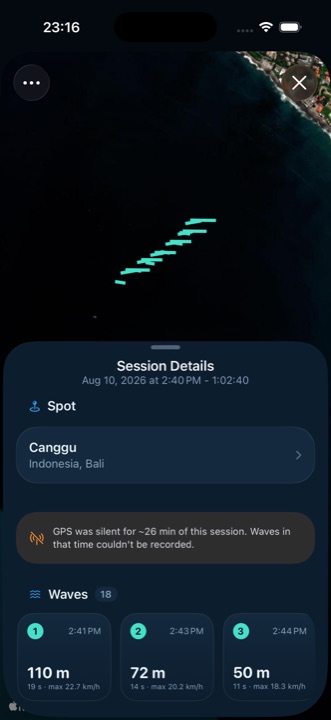
The session moves to your iPhone by itself — every wave on the map, the totals underneath, and an honest note if the GPS lost you for a stretch.
Sessions
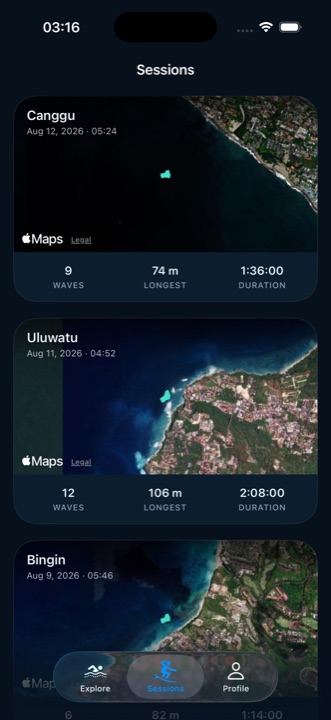
Every session lands with its spot already attached, its waves already counted and its track already drawn. Nothing to write up afterwards.
Apple Watch
The watch app is not a remote control for the phone — it is the half that records. Where other apps put speed, Surfbreak puts the tide: between waves you are sitting still, and the water level is the thing that's actually changing.
FAQ
For the forecast, no — that half is the iPhone app, and it is the whole reason most people open Surfbreak. For counting waves, yes: the tracking runs on the watch's own GPS and motion sensors, because that is the device that goes in the water with you.
By speed, against a threshold that adapts to the session rather than a fixed number — then a ride has to hold that speed long enough, cover enough ground and keep a steady course to count. Foam and fast paddling get thrown out by the same rules that keep the short, sharp rides in.
From the Doppler speed your watch reports, integrated over the ride — not by joining up GPS dots. At the accuracy a wrist in the water gets, the dots jitter by metres between fixes, which either inflates a ride or throws away real metres along with the phantom ones.
Sometimes it does — a wrist underwater is a hard place to hold a satellite fix. When the coverage of a session is poor, Surfbreak says so on the session itself: "GPS was silent for ~N min. Waves in that time couldn't be recorded." A gap that reads as "nothing happened" would be worse than an honest one.
183 breaks across Indonesia: Bali, Lombok, Sumbawa, Java and the Mentawai Islands.
No. Guest mode is the whole app, and it works with the radio off. Sign in with Apple or Google and your sessions back up to the cloud and come back on a new phone. You can delete the account, and everything in it, from inside the app.
English, Bahasa Indonesia, Spanish and Russian — with the units and compass points translated too. The surf jargon stays in English, because offshore is what surfers say everywhere.
More apps
Clean, focused tools built for everyday life on iPhone.
 Quitwell
Counts the days without it — alcohol, nicotine, vaping, anything you decided to leave behind, with an urge button for the hard minutes.
Quitwell
Counts the days without it — alcohol, nicotine, vaping, anything you decided to leave behind, with an urge button for the hard minutes.
 Revera
Restores old photographs — colour, tears and scratches — and leaves the face exactly as it was.
Revera
Restores old photographs — colour, tears and scratches — and leaves the face exactly as it was.
 RopeFlow
Count every jump with your iPhone camera, Apple Watch or AirPods — 13 programs, streaks and 82 achievements.
RopeFlow
Count every jump with your iPhone camera, Apple Watch or AirPods — 13 programs, streaks and 82 achievements.
 BorderLog
Track your border crossings and travel history. Never lose count of your days abroad.
BorderLog
Track your border crossings and travel history. Never lose count of your days abroad.
 iCurrency
Currency converter for 160+ currencies and top crypto with live rates and offline mode.
iCurrency
Currency converter for 160+ currencies and top crypto with live rates and offline mode.
 Followly
See who unfollowed you on Instagram — track followers, ghosts and non-followers, privately on your device.
Followly
See who unfollowed you on Instagram — track followers, ghosts and non-followers, privately on your device.
 iHabits
Build lasting habits with streaks, progress calendars, and home screen widgets.
iHabits
Build lasting habits with streaks, progress calendars, and home screen widgets.
 Hale
Calm anxiety in 60 seconds with four guided breathing techniques and a quiet voice.
Hale
Calm anxiety in 60 seconds with four guided breathing techniques and a quiet voice.
 Voca
Record meetings and interviews — Voca marks who said what and pulls out the tasks.
Voca
Record meetings and interviews — Voca marks who said what and pulls out the tasks.
 Renewly
A privacy-first subscription tracker — capture receipts on device, get reminded before every charge, and pay once.
Renewly
A privacy-first subscription tracker — capture receipts on device, get reminded before every charge, and pay once.
Check the forecast tonight. Let your watch do the counting tomorrow.
Download on the App Store